https://khetigaadi.com/new-tractor-model/massey-ferguson-241-di/en
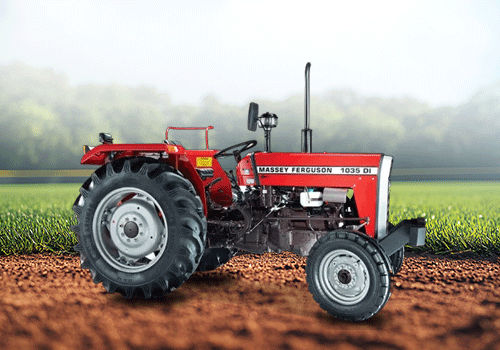
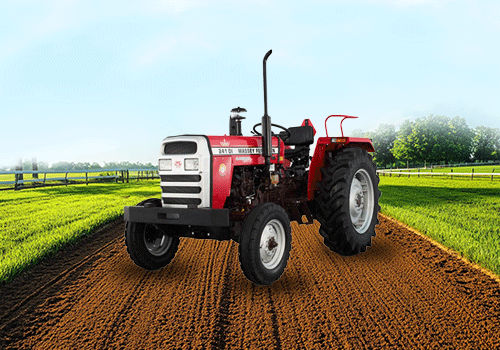
The Massey Ferguson 241 DI is a popular tractor among Indian farmers because of its reliable performance, fuel efficiency, and affordable maintenance costs. It is designed to handle a wide range of farming activities, making it a practical choice for small and medium-sized farms. With a powerful engine and strong lifting capacity, this tractor can easily perform tasks such as ploughing, cultivation, sowing, spraying, and transportation.
Engine Performance
The tractor comes with a 42 HP engine and a 2500 CC, 3-cylinder diesel engine that delivers consistent power in different farming conditions. The engine is built to provide good fuel efficiency while maintaining strong performance during long working hours. This combination helps farmers complete their work efficiently without excessive fuel consumption.
Transmission and Gear System
Massey Ferguson 241 DI is equipped with an 8 forward and 2 reverse gear system, allowing farmers to select suitable speeds for different agricultural operations. The transmission system is designed to provide smooth gear shifting and better control while working in the field or transporting loads. A dual-clutch system further improves operational efficiency.
Hydraulic Capacity
One of the key strengths of this tractor is its hydraulic lifting capacity of up to 1700 kg. This allows it to work effectively with various agricultural implements such as cultivators, rotavators, ploughs, and seed drills. Farmers can easily handle heavy equipment without compromising performance.
Braking and Steering
The tractor is available with both manual and power steering options, giving buyers flexibility based on their requirements and budget. Power steering makes driving easier, especially during long working hours. The tractor also offers advanced braking options that provide better control and safety during field operations and road transport.
Comfort and Usability
The Massey Ferguson 241 DI is designed with farmer comfort in mind. The controls are easy to access, and the tractor offers a comfortable driving experience even during extended working hours. Its balanced design and sturdy build help maintain stability on different types of terrain.
Suitable Applications
This tractor can be used for a variety of farming and transportation activities, including:
Ploughing and tillage
Cultivation
Rotavator operations
Spraying
Haulage and transportation
Harvest-related work
General farm utility tasks
Its versatility makes it a dependable machine for everyday agricultural operations.
Price Range
The Massey Ferguson 241 DI is generally available in the price range of approximately ₹7 lakh to ₹7.65 lakh (ex-showroom). The final on-road price may vary depending on the state, dealer location, taxes, and additional accessories selected by the buyer.
Conclusion
The Massey Ferguson 241 DI is a dependable tractor that offers a good balance of power, performance, and affordability. Its 42 HP engine, strong hydraulics, fuel-efficient operation, and versatile applications make it a suitable choice for farmers looking for a reliable tractor for daily agricultural work. Whether it is field preparation, cultivation, or transportation, this tractor is capable of handling multiple farming requirements efficiently.
https://khetigaadi.com/new-tractor-model/massey-ferguson-241-di/en
The Massey Ferguson 241 DI is a popular tractor among Indian farmers because of its reliable performance, fuel efficiency, and affordable maintenance costs. It is designed to handle a wide range of farming activities, making it a practical choice for small and medium-sized farms. With a powerful engine and strong lifting capacity, this tractor can easily perform tasks such as ploughing, cultivation, sowing, spraying, and transportation.
Engine Performance
The tractor comes with a 42 HP engine and a 2500 CC, 3-cylinder diesel engine that delivers consistent power in different farming conditions. The engine is built to provide good fuel efficiency while maintaining strong performance during long working hours. This combination helps farmers complete their work efficiently without excessive fuel consumption.
Transmission and Gear System
Massey Ferguson 241 DI is equipped with an 8 forward and 2 reverse gear system, allowing farmers to select suitable speeds for different agricultural operations. The transmission system is designed to provide smooth gear shifting and better control while working in the field or transporting loads. A dual-clutch system further improves operational efficiency.
Hydraulic Capacity
One of the key strengths of this tractor is its hydraulic lifting capacity of up to 1700 kg. This allows it to work effectively with various agricultural implements such as cultivators, rotavators, ploughs, and seed drills. Farmers can easily handle heavy equipment without compromising performance.
Braking and Steering
The tractor is available with both manual and power steering options, giving buyers flexibility based on their requirements and budget. Power steering makes driving easier, especially during long working hours. The tractor also offers advanced braking options that provide better control and safety during field operations and road transport.
Comfort and Usability
The Massey Ferguson 241 DI is designed with farmer comfort in mind. The controls are easy to access, and the tractor offers a comfortable driving experience even during extended working hours. Its balanced design and sturdy build help maintain stability on different types of terrain.
Suitable Applications
This tractor can be used for a variety of farming and transportation activities, including:
Ploughing and tillage
Cultivation
Rotavator operations
Spraying
Haulage and transportation
Harvest-related work
General farm utility tasks
Its versatility makes it a dependable machine for everyday agricultural operations.
Price Range
The Massey Ferguson 241 DI is generally available in the price range of approximately ₹7 lakh to ₹7.65 lakh (ex-showroom). The final on-road price may vary depending on the state, dealer location, taxes, and additional accessories selected by the buyer.
Conclusion
The Massey Ferguson 241 DI is a dependable tractor that offers a good balance of power, performance, and affordability. Its 42 HP engine, strong hydraulics, fuel-efficient operation, and versatile applications make it a suitable choice for farmers looking for a reliable tractor for daily agricultural work. Whether it is field preparation, cultivation, or transportation, this tractor is capable of handling multiple farming requirements efficiently.